
Capturing sales notes
Most sales engagements go through several steps – some contact over the phone, sometimes some emails or SMS’s and often a meeting or two. It’s important that as you go, you can prepare for the next contact by checking back over prior contact and follow the flow of the conversation. Capturing the outcome using our drop-down menus is a start, but most users also use our sales Notes feature to add context to the narrative.
Outcome notes
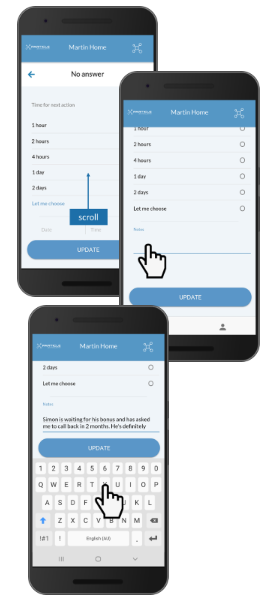
Whenever capturing the outcome of the event, its best practice to add a note that captures the context of the discussion. This is a simple three-step process.
- Scroll down for notes panel: all outcome screens have a notes panel above Update
- Touch screen in notes section: this will bring up your keyboard
- Enter your note: type your note in and hit Update to save
This is all about capturing some information that will help you prepare for your next call. Examples of the kind of thing that can prove helpful are:
1. Further explanation of the outcome
- After you select the outcome and reason-why, e.g. “Not ready/schedule future call”
- perhaps there’s more information you can add: “Bob is keen but heading to bali on holidays for a month. Wants to talk on his return.”
- you now know to open the next call with a question about how his trip to Bali went.
2. Explanation of the timing or location of the next contact event
- Let’s say the timing of the event is noteworthy – say its not for another 3 weeks
- it’s helpful to record why; say: “Jen is keen, but off to Bali for holidays with her kids”
- this provides a great way to open the next conversation with Jen
Record the story
Busy salespeople can’t hope to recall the detail of all customer contact, yet the customer expects it. Martin’s Sales Notes feature helps you address this by capturing summary at each step in the conversation. Prior to each chat, check the record to see the the conversation to date, and set the call up perfectly.
Profile Notes
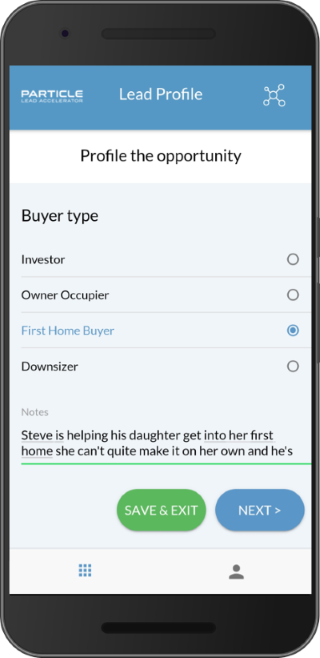
We encourage you wherever possible to capture profile information on your customers. Our profile tool with its drop-down menus and conditional logic will help you capture the key information, but it’s often helpful to make a note as well. This can help to:
1. Explain the choice the client’s made
Often the choice they’ve made can appear odd when later revisited and needs some context. For example, they may have chosen contradictory inputs:
- Samantha is in retirement, where wealth preservation is normally the priority, but instead is still looking for solid investment growth and willing to embrace risk
- No doubt the client has a good reason & this should be captured in a Note: “Samantha’s retirement is well covered with upwards of $2m in her allocated pension. So she is looking to maximise returns on the $600k in her discretionary wrap”
2. Capture a prompt for the next conversation
Perhaps there’s something that you want to follow-up on when you next talk. For example, the input may be incomplete or not sit well with you:
- Steve’s helping his daughter buy her first apartment, and he’s answered the profile on her behalf – Dad’s are not always the most reliable source of info on their offspring!
- A prompt would be helpful: “Remember, Steve’s buying it but it’s for Maria – so double-check his bedroom/study/balcony inputs with Maria at display visit on Saturday”
Viewing Notes
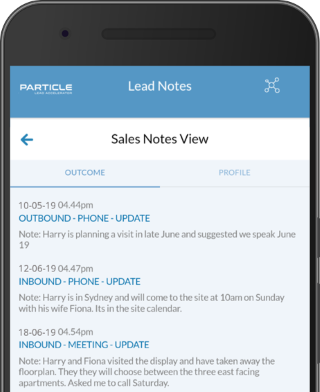
Most sales-people work hard to prepare well for their client conversations. Martin makes this easier by presenting the various Notes the salesperson has taken in summarised form.
Prior to each meeting, it’s a good idea to check the event history and also the notes. They are available via a link in the lead status and are presented separately as:
- Outcome Notes: a summary of the notes taken at the end of each contact – essentially a steps by step story of the conversation so far.
- Profile notes: a summary of notes against the profile you have for the client – providing context to help explain the person better.