
Phone conversations drive engagement
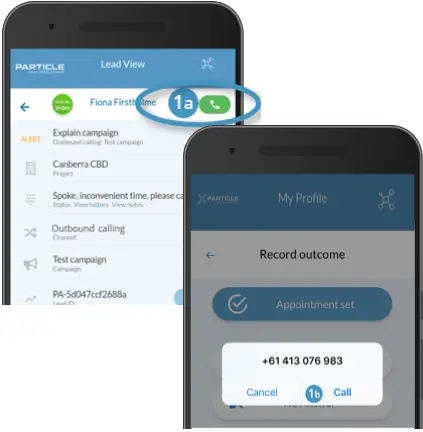
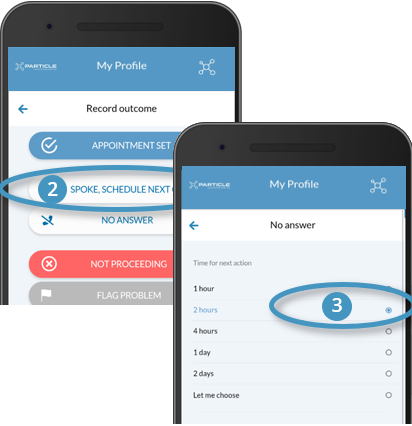
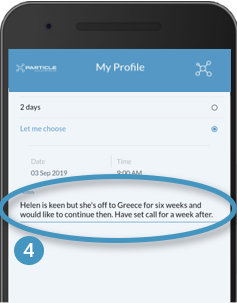
A live conversation is generally needed to engage a customer on a purchase journey. Martin helps you get into a live conversation as soon as possible through prompts and press button dialing. Martin offers click to dial (1) to help you quickly and easily connect with your customer. At the press of the call button, Martin will initiate a call via your phone. Once on the call, Martin provides tools to capture call outcomes (2), to set up the next action (3) and make notes for context (4). The following details how to use these calling functions.
PLEASE NOTE
Calls must be made from your handset so that they can be tracked for reporting and workflow.
To establish contact with a client by phone, find the lead in your lead list and open:
1. Trigger the call
- 1 a: Select the call button next to lead status
- This will open your default dialler
- 1 b: Click on the dialler to confirm the call
- The client’s number is auto-loaded in the background
- Complete your call and hang- up
Two-step dialling
Martin uses your handset to make the call. This generally provides better connectivity than if the call was made as a web call.
2. Capture a call outcome
- Return to the app
- The app will prompt you to capture an outcome for your call
- Select a suitable outcome
3. Set your next action
- If agreed capture the meeting date and time
- If not, then go ahead and select a good time for your next call
- You can plan a call for years in the future
- When selecting a time for the next call have a think about your chances of contact with that customer.
- This study from the US explores the impact of day and time of call on contact and conversion https://www.leadresponsemanagement.org/lrm_study
Incomplete attempts & call count
A call count is kept to help manage the Lead closing feature. Note that incomplete calls are not included if, after an incomplete call, you try again within 5 minutes. In this case, Martin will only count one attempt.
4. Add some context
- It’s important to capture some context to help when you are preparing for your next call
- To capture a Sales Note, Click on the “Notes” field
- Enter comments on the call – perhaps on why you’ve captured the outcome you selected
- For voice support, go to Voice to Text to learn about how this feature can help you capture better notes, faster
- Select Update to save and return to the lead queue
5. After the call
- Tracking: Each call will be tracked and can be viewed in your History screen
- SMS messaging: If a client doesn’t answer, an automated missed call SMS is sent on your behalf. See Missed call SMS for more
- Ad-hoc SMS messaging is in development. See SMS contact for more